If you got a call from an unknown number and want to know who it belongs to, you are not alone. Millions of people in Pakistan deal with unknown calls every day — spam, fraud, or just someone you forgot to save. The good news is that checking SIM owner details in Pakistan is easier than ever in 2026, and many methods are completely free.
This guide covers every working method to find out who owns a SIM number in Pakistan. Whether you want to use your phone, the PTA portal, or an online reverse lookup tool like DB Center, you will find a step-by-step process for each one.
Why Would You Need to Check SIM Owner Details?
Before getting into the methods, here is why people search for this information:
- You received a threatening or harassing call
- Someone called your family members from an unknown number
- You want to verify if a seller or buyer on OLX is using a registered SIM
- You received a fraud or scam call asking for money
- You just want to confirm who is contacting you before calling back
These are all valid reasons. Knowing who is behind a phone number helps you stay safe and make better decisions.
Method 1: Check SIM Owner Details Using PTA's Official Service
The Pakistan Telecommunication Authority (PTA) runs an official system to check how many SIMs are registered on your own CNIC. While this does not let you look up a stranger's personal details (due to privacy laws), it helps you verify your own SIM registrations and report suspicious numbers.
Step-by-Step:
Step 1: Open the messaging app on your phone.
Step 2: Type your 13-digit CNIC number (without dashes).
Step 3: Send this SMS to 668.
Step 4: You will get a reply from PTA showing how many SIM cards are registered on your CNIC, along with the network names.
Step 5: If you see a SIM you did not register, report it immediately to PTA at 0800-55055 (toll-free).
This service is free and works on all networks including Jazz, Telenor, Zong, Ufone, and SCOM.
Method 2: Use DB Center for Reverse Phone Lookup
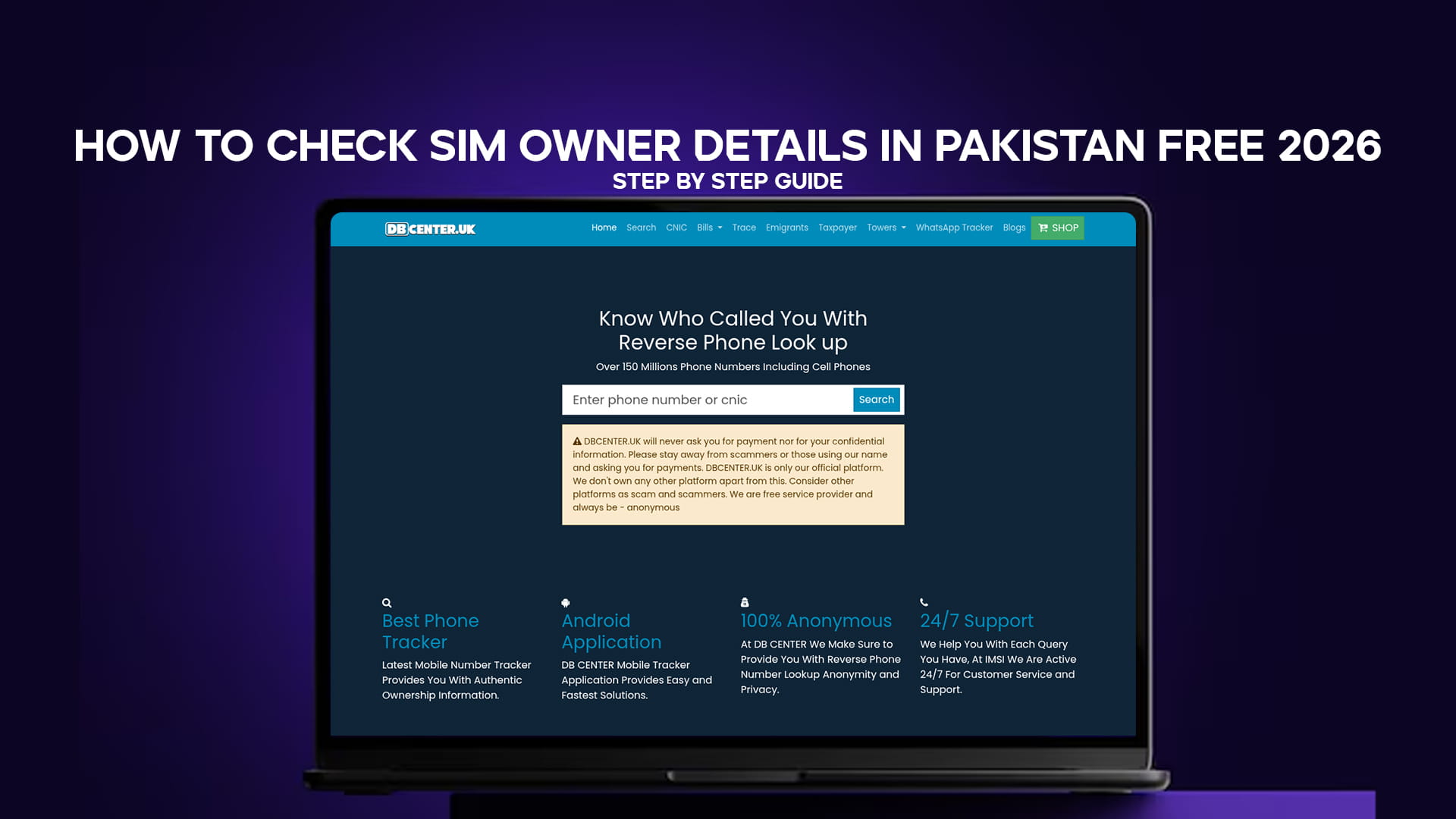
If you want to find out who called you from an unknown Pakistani number, DB Center is one of the most reliable tools you can use online. It offers a reverse phone lookup service with a database of over 150 million phone numbers, including mobile numbers.
What is DB Center?
DB Center (available at DBCenter.uk) is a phone number lookup platform. People who receive calls from unknown numbers use it to search that number and see if it has been reported or identified by others. The database includes cell phone numbers and landlines from multiple countries, including Pakistan.
Step-by-Step: How to Use DB Center
Step 1: Open your browser and go to DBCenter.uk.
Step 2: On the homepage, you will see a search bar. Enter the Pakistani mobile number you want to look up. Include the country code (+92) or the local format starting with 03.
Step 3: Press the search button.
Step 4: DB Center will show you available information about that number. This can include user-submitted reports, spam alerts, and identification details if other users have tagged that number.
Step 5: If you have received calls from that number and want to help others, scroll down and leave a comment or report. This helps the community.
DB Center is free to use and does not require you to create an account for basic searches. The platform is particularly useful for identifying scam callers, telemarketing numbers, and harassing calls.
Method 3: Check SIM Owner via Network Operator USSD Codes
Each major network in Pakistan has a USSD code or SMS service that lets you check information about a number. Here is what works in 2026:
Jazz / Warid Numbers
- Dial *123# from your Jazz SIM to check your own account details.
- To find out which network a number belongs to, use third-party tools or simply call the number and listen to the automated welcome message.
Telenor Numbers
- Dial *345# to access the Telenor self-service menu.
- You can check your own registered details here.
Zong Numbers
- Dial *310# for Zong's self-service options.
Ufone Numbers
- Dial *336# for Ufone account services.
Note: These USSD codes let you manage your own SIM. They do not show you the registered owner name of another person's number. Pakistani telecom companies do not publicly share subscriber names for privacy reasons. For finding who called you, use DB Center or the community-reporting method below.
Method 4: Use the PTA Device & SIM Verification Portal
PTA launched a web-based portal for citizens to check SIM registration status online. Here is how to use it:
Step 1: Visit the official PTA website at https://www.pta.gov.pk
Step 2: Look for the "Citizen Services" or "SIM Information" section. (The portal updates from time to time, so navigation may shift slightly.)
Step 3: Enter your CNIC number in the provided field.
Step 4: Complete the CAPTCHA verification.
Step 5: Click submit. You will see a list of all SIM cards registered to your CNIC across all networks.
If you see any number that you did not register yourself, contact your telecom operator immediately and file a complaint with PTA. Unauthorized SIM registration is a criminal offense in Pakistan.
Method 5: Call PTA Helpline to Report Unknown or Suspicious Numbers
If someone is harassing you or making threatening calls, you have the right to report them directly to PTA. Here is how:
- PTA Helpline: 0800-55055 (toll-free, available on all networks)
- Complaint Portal: Visit complaints.pta.gov.pk to file an online complaint
- FIA Cybercrime Wing: For serious harassment or fraud cases, contact FIA at nr3c.gov.pk or call 9911
When filing a complaint, keep a record of the date, time, and exact number that called you. Screenshots of messages or call logs help strengthen your case.
Method 6: Community-Based Reverse Lookup Through DB Center
One of the most accurate ways to identify an unknown caller is through community reporting. Here is how DB Center's system works for this:
When someone receives a call from a number they do not recognize, they search it on DB Center. If others have already searched and commented on that number, you will see their reports. These reports often include details like:
- The caller claiming to be from a bank
- Repeated missed calls with no message
- A known telemarketing agency
- A reported fraud attempt
This crowd-sourced approach is surprisingly accurate for Pakistani numbers because millions of users contribute to the database. Over time, problematic numbers get flagged, and legitimate businesses get identified.
How to contribute:
Step 1: Search the number on DB Center.
Step 2: Scroll to the comments or report section at the bottom of the result page.
Step 3: Write what you experienced when this number called you.
Step 4: Submit your report. Other users searching the same number will now see your input.
This takes less than two minutes and helps protect others from scam calls.
How to Tell Which Network a Pakistani Number Belongs To
Before looking up a number, it helps to know which operator it belongs to. In Pakistan, mobile numbers follow a simple pattern:
| Number Prefix | Network |
|---|---|
| 0300, 0301, 0302, 0303 | Jazz |
| 0304, 0305 | Zong |
| 0306, 0307 | Warid (Jazz) |
| 0311, 0312, 0313, 0314, 0315 | Zong |
| 0320, 0321, 0322, 0323, 0324 | Ufone |
| 0330, 0331, 0332, 0333 | Telenor |
| 0340, 0341, 0342, 0343, 0344, 0345 | Telenor |
Knowing the network helps you narrow down your search and speeds up any complaint you want to file with that specific operator.
Is It Legal to Check SIM Owner Details in Pakistan?
This is a question many people ask. The short answer is: checking your own SIM registrations is completely legal. Looking up general community-reported information about a number through platforms like DB Center is also legal.
However, accessing private subscriber data without authorization — like trying to get someone's name and address from a mobile number — is not something any legitimate platform or person can legally do in Pakistan. The Pakistan Telecommunication Act protects subscriber privacy. Telecom companies will not share registered names of individuals with the public.
What you can legally do:
- Check how many SIMs are on your own CNIC
- Search a number on community databases to see if others flagged it
- Report a harassing or fraudulent number to PTA or FIA
- Use DB Center to see if a number has been reported as spam
What you cannot do:
- Force a telecom company to give you another person's name
- Use any hacking tool or unofficial exploit to access subscriber databases
Stay within these limits and you are completely fine.
Tips to Protect Your Own SIM from Misuse
While checking unknown numbers is important, protecting yourself is equally necessary. Here are practical steps every Pakistani mobile user should take in 2026:
1. Verify your SIM registrations regularly. Send your CNIC to 668 every few months. If a new number has appeared that you did not register, act immediately.
2. Never share your CNIC photos with strangers. Scammers use CNIC copies to register SIMs illegally. Online sellers and unknown contacts do not need your CNIC.
3. Use biometric verification when buying a SIM. All SIM sales in Pakistan require biometric verification at authorized franchises. Never buy a SIM from an unauthorized source — it may already be registered to someone else.
4. Block spam numbers immediately. On Android, open the call log, tap the number, and select "Block." On iPhone, go to Recent Calls, tap the info icon, and select "Block this Caller."
5. Report fraud numbers to FIA. If someone called you claiming to be from a bank or offering fake prizes, report it to the FIA Cybercrime Wing. This creates a paper trail.
How DB Center Helps Pakistanis Find Who Called Them
DB Center is not just a generic phone directory. It works specifically well for reverse lookups because the database keeps growing with user-submitted information. Here is why it is useful for Pakistani users specifically:
- It covers Pakistani mobile numbers across all major networks
- Users from Pakistan regularly report scam callers and update the database
- You do not need to install an app — the website works on any phone browser
- Searches are fast, usually returning results within seconds
- The platform covers over 150 million numbers globally, so even international numbers calling Pakistani users can sometimes be identified
For anyone in Pakistan dealing with unknown calls, searching the number on DB Center before calling back is a smart habit.
Frequently Asked Questions
Q: Can I find the name of a SIM owner for free in Pakistan? You cannot get a private subscriber's full legal name from a phone number through any free legal method. What you can find is whether the number has been reported by others, which network it belongs to, and whether it is associated with spam or fraud activity. DB Center is the best free tool for this.
Q: What if someone is using my CNIC to register SIMs? Send your CNIC number (13 digits, no dashes) to 668. If you see numbers you did not register, call PTA at 0800-55055 and file a complaint. Visit the nearest franchise of the concerned network with your original CNIC for further action.
Q: Is DB Center available in Pakistan? Yes. DB Center works globally, including in Pakistan. You can open it in any browser on your phone or computer. No app download or account is needed for basic number lookups.
Q: Which method is fastest for checking a missed call number? Searching the number on DB Center is the fastest option. Open the website, type the number, and results appear in seconds. If you want PTA-related information about your own SIMs, the SMS to 668 is the quickest official method.
Q: Can I check SIM owner details on WhatsApp numbers? WhatsApp uses the mobile number registered to the SIM. So if you want to look up a WhatsApp contact, the same number search on DB Center applies. Just use the phone number linked to their WhatsApp account.
Final Thoughts
Checking SIM owner details in Pakistan in 2026 is straightforward when you use the right tools. The PTA SMS service (668) covers your own SIM registrations. DB Center handles reverse lookups for unknown callers. The PTA portal and helpline handle complaints and official verification.
For everyday use — like finding out who called you from an unknown number — DB Center is the most practical free option. It runs a database of over 150 million numbers and regularly receives updates from users reporting spam and fraud calls across Pakistan and worldwide.
Use these methods responsibly, stay within the law, and report suspicious numbers so others stay safe too.